
 ChatGPT
 Perplexity
 Claude
 Grok

Most people know ChatGPT as a chat window: you type in a question, and it gives you an answer. With ChatGPT Work, OpenAI has introduced a second feature that works differently. Here, you don’t ask questions—you assign tasks. The AI then works independently with your files and tools—sometimes for several minutes, sometimes for over an hour—and ultimately delivers a finished result to you.
This article explains exactly what ChatGPT Work is, what it consists of, how much it costs, and how to set up your first project properly.
What is ChatGPT Work?
ChatGPT Work is an AI agent in the ChatGPT app. Instead of answering a question, it takes on an entire task: It plans the necessary steps, works with files on your computer and with connected tools, and delivers a finished result—such as an Excel analysis, a presentation, a document, or an organized folder.
OpenAI describes Work at the Product Page as a platform that uses apps, files, browsers, and context to create documents, presentations, spreadsheets, and web pages. It runs on the same agent technology as Codex, OpenAI’s programming agent. Codex is geared toward software, while Work focuses on knowledge work in fields such as finance, marketing, sales, human resources, and administration.
If you're mainly wondering when to use Work and when to use the regular chat, you'll find guidance in the article on the difference between ChatGPT Work and Chat.
Why is the desktop app so important?
Work is available in the browser, the mobile app, and the desktop app, but the three are not equivalent. The full range of features is available only in the desktop app, because it is the only one that supports two modes of operation.
Local Mode: Work runs on your computer, reads files directly from the hard drive, and writes new files to your folders. Large data exports that fail when uploaded via a browser are no problem here, because nothing needs to be uploaded. There’s also a built-in browser that Work can control itself. The catch: Your computer must remain turned on while the job is running.
Cloud Mode: Work runs on OpenAI's servers. The task continues to run even if you close your laptop. However, in this mode, Work cannot access your local files—only connected online services.
For most office tasks involving your own files, local mode is the right choice.
What are the components of ChatGPT Work?
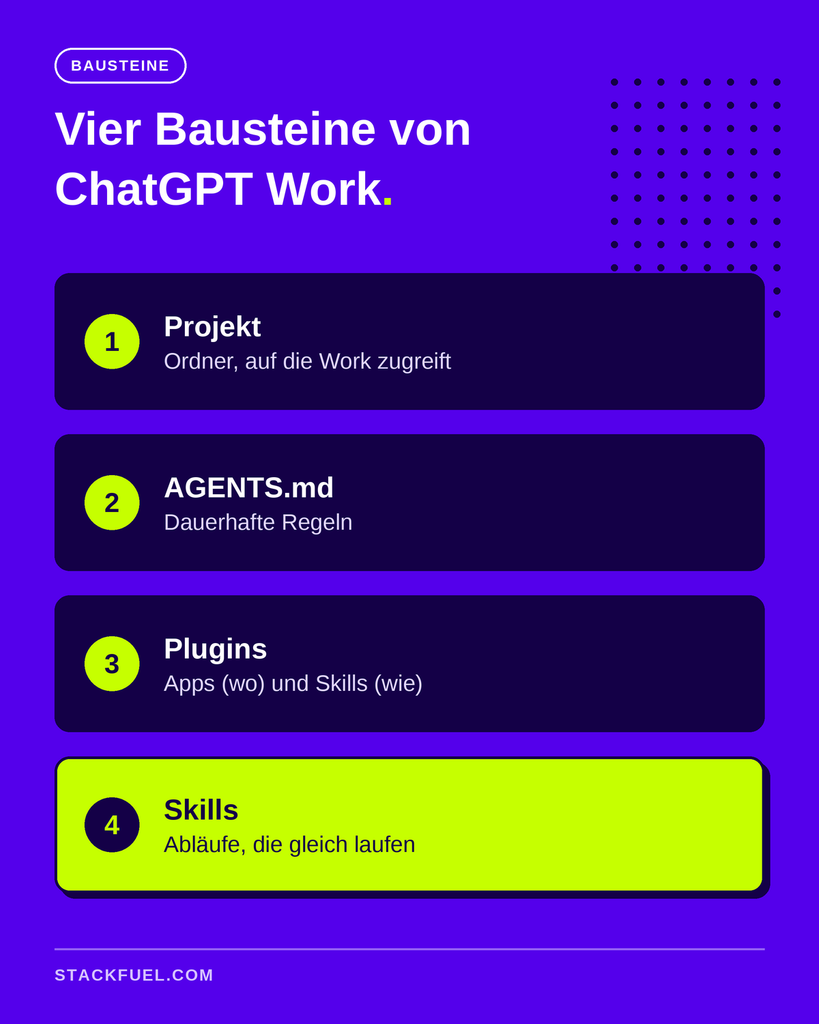
If you want to get the most out of Work, there are four terms you should know. They determine whether your results will be random or consistently good.
Projects
Every task in Work should be part of a project. A project is a workspace to which you assign one or more folders on your computer. Work is then allowed to read from and write to only those folders—and nowhere else. In the sidebar, you can see all the files in the project and track what Work creates or changes.
A project can contain multiple folders, but only one main folder. This main folder plays a role in the next module.
AGENTS.md
AGENTS.md is a simple text file located in the project’s main folder. It contains permanent instructions that Work reads at the beginning of each session: where certain files are located, which templates apply, and what must never happen. For example: „Never create a new Excel file; instead, always add documents to the existing list and check for duplicates first.“
The effect is noticeable. Without this file, Work has to search for where everything is located at the start of every session, which takes time and uses up your quota. With the file, it knows right away. The rule of thumb: If you type the same command a second time, it belongs in AGENTS.md.
Plugins: Apps and Skills
Work connects to other services via plugins. According to OpenAI, there are now more than 1,400 plugins to choose from. What matters is what a plugin offers: It bundles Apps and Skills. The app connects Work to a tool—such as Gmail or Google Drive—and thereby tells it where to work. The skill is a saved set of instructions and tells it how to work. OpenAI describes the structure in its Skills Documentation.
One potential pitfall during installation: Some plugins ask you to connect to your account right away, while others include multiple apps that you must connect individually before they’ll work. So be sure to check each plugin after installation. With @ you can specifically call plugins on behalf of, using / Skills.
If there isn't a plugin for a tool, this often helps Model Context Protocol, an open standard that allows AI applications to connect to external systems. Many providers offer their own access for this purpose, which you can add in the settings. Depending on your plan, an admin may need to enable this.
Skills
Skills are the building blocks that help Work improve over time. A skill defines a workflow so it runs the same way every time: your report layout, your document storage system, your newsletter format. The difference is measurable. A marketing email that Work puts together generically in eight minutes without a skill can be created in under two minutes with the right skill—and it looks just like your own emails.
It's best not to write skills by hand. Work through the task once with Work, correct it until the result is right, and then save the process using the built-in Skill Creator.
What else can ChatGPT Work do?
In addition to the basic features, Work offers several functions that save a lot of time in everyday use:
- Planned Tasks: A skill runs automatically at set times—for example, the weekly report runs every Monday at eight.
- Sub-agents: Work can break down a large task and run multiple instances of itself in parallel—for example, one per region when conducting market research.
- Planning Mode: Work first presents a plan that you can review and adjust before getting started.
- Remote: In the mobile app, you can view active orders from your desktop and send new instructions.
- Sites and Spaces: Depending on the plan, Work can create simple websites and set up workspaces for teams.
How much does ChatGPT Work cost?
According to OpenAI, Work is available on all plans, including the free one. However, access and features vary significantly (as of October 2026):
- Free and Go: Works only in the desktop app, with strict limits. Scheduled tasks are not included.
- Plus and Pro: Work is also available in the browser and in the mobile app, with significantly higher quotas.
- Business and Enterprise: In addition, it offers team features and management tools. According to OpenAI, the data is not used for training; the Enterprise plan offers data storage in the EU upon request.
You can find the current prices and the exact breakdown on the ChatGPT Pricing Page. Note: Work requests use significantly more quota than normal chats because many individual steps run in the background.
How do you get started on your first assignment?
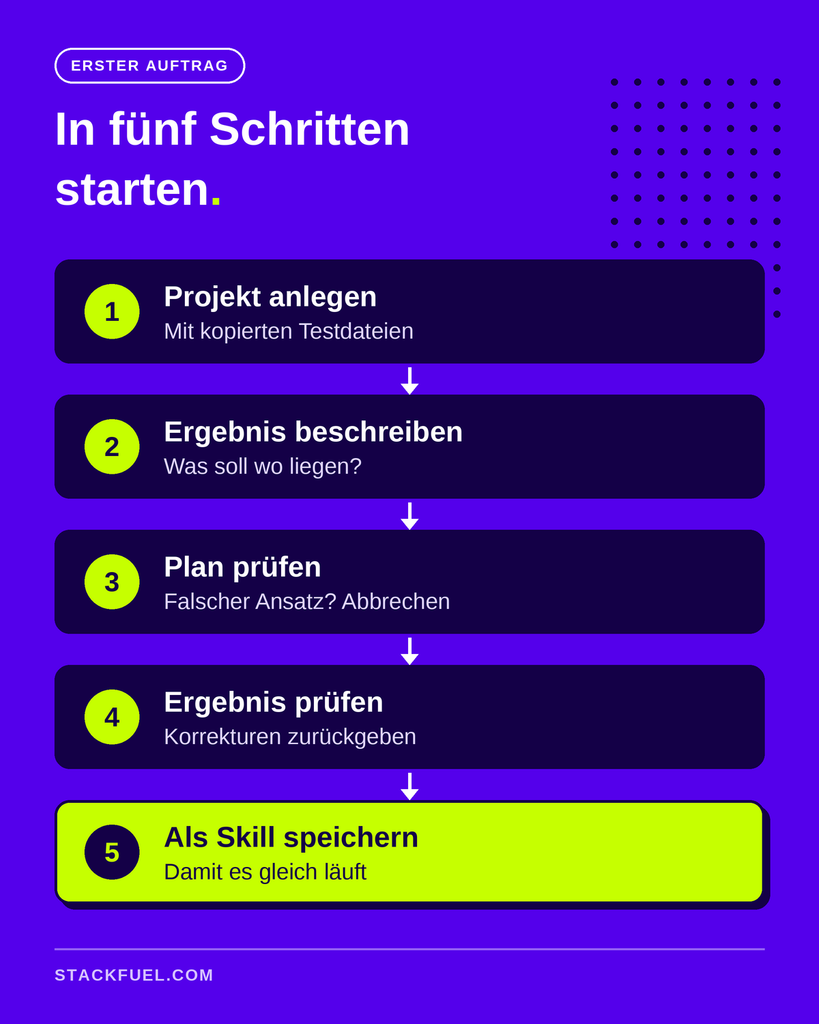
A good first assignment is small, clear, and easy to evaluate. This process has proven effective:
- Install the desktop app and sign in.
- Create a Project and assign a folder containing test files—preferably copies, not originals.
- Describe the result: Where should everything end up? For example: „Review all receipts in this folder, create an Excel list with the date, amount, and merchant, and flag any illegible receipts for review.“
- Reading a map: Work shows how it intends to proceed. If the approach isn't working, stop and make adjustments.
- Check the result and return corrections as instructions, rather than quietly making them yourself.
- Ensure repetition: If the process goes well, save it as a skill and document the rules in AGENTS.md.
The clearer you are in your wording, the better the result will be. This article explains the basics of good instructions and how you can Using ChatGPT Prompts Correctly. For data work, it's worth taking a look at the AI Tools for Data Analysts.
Where are the limits?
Work is a powerful tool, but it doesn’t run on its own. Longer runs mean bigger mistakes if something goes wrong, and an agent sounds just as convinced when the results are wrong as when they’re right. Therefore, build the validation into the task, for example, by specifying that every number in a table must be a formula. The built-in browser is also the most unreliable part: a direct connection via a plugin is almost always more stable.
The real hurdle is rarely the tool itself, but rather the way work is done. According to the McKinsey Study „The State of AI 2026” 80 percent of respondents say that AI has improved their personal productivity. However, the companies that derive the greatest benefit differ primarily in that they fundamentally redesign their workflows rather than simply integrating AI into existing processes. This is exactly the case with Work: Those who can formulate a task as a clear assignment with a verifiable outcome reap the majority of the benefits.
The following provides a comparison with agents from other providers: Comparison of ChatGPT, Gemini, and Claude. If you want to build verifiable AI skills, you'll find an overview of your options at AI further training.
StackFuel offers the AI Continuing Education including continuing education in AI specialist. The programs last one to two months full-time or three to four months part-time and cover the use of AI assistants, automation with n8n, and AI agents. StackFuel has been AZAV-certified since 2020. Funding through the education voucher is possible, but there is no legal entitlement to it.
Frequently Asked Questions About ChatGPT Work
Is ChatGPT Work free? Yes, in the desktop app, but with strict limits. The browser version, mobile app, and higher quotas are available starting with the Plus plan. Scheduled tasks are not available in the Free and Go plans.
Is ChatGPT Work the same as Codex? Behind the scenes, both use the same agent technology. Codex is geared toward software development, while ChatGPT Work is geared toward knowledge work such as analyses, reports, and presentations.
Can ChatGPT Work access my files? Yes, in the desktop app's local mode, but only for the folders you assign to a project. In cloud mode, it doesn't access local files.
What is AGENTS.md? A text file in a project's main folder containing permanent instructions. Work reads it at the start of each session so you don't have to repeat the rules every time.
What is the difference between a plugin, an app, and a skill? A plugin is an installable package. It contains apps that connect Work to a tool, and skills that define a workflow. The app specifies where the work takes place, and the skill specifies how.
How long does an order take? From a few minutes to over an hour. Small sorting tasks are quick, while analyses involving multiple data sources take significantly longer.
Your Next Step
Create a test project with copied files and give Work a small task whose result you can easily verify. If you want to learn how to use AI agents like ChatGPT Work safely and productively on the job, and would like to know if a subsidized training program is right for you, Schedule a free consultation.